When Claude Goes Silent: Navigating API Timeouts and Model Selection in Claude Code
The other day, while working on a critical refactoring task, Claude Code suddenly stopped responding. The familiar token consumption animation froze, requests timed out, and my productivity ground to a halt. If you’ve experienced this frustrating scenario—watching tokens not being consumed while your deadline approaches—you’re not alone.
The culprit? API issues with specific Anthropic models. The solution? Understanding how to diagnose the problem, switch between Claude’s model family, and leverage fallback options. Here’s what I learned during my unexpected deep dive into Claude Code’s model flexibility.
🔴 The Silent Failure: When Tokens Don’t Flow
The first sign something was wrong came subtly. I sent a request to refactor a complex Terraform module, and instead of the usual immediate response, I saw:
- No token consumption in the Claude Code interface
- Spinning request indicators that never resolved
- Failed requests with vague “API unavailable” messages
What made this particularly confusing was that it wasn’t a complete outage—Claude Code was running, authenticated properly, and showed no obvious errors. It was just… silent.
The Investigation Process
My first instinct was to check the usual suspects:
- Network connectivity: Everything else worked fine
- API key validity: Still active and authenticated
- Claude Code version: Up to date
- Local configuration: No recent changes
Nothing seemed wrong on my end, which led me to the critical question: Is this a problem with Anthropic’s services?
🔍 Checking Anthropic’s Status Page
This is where many developers get stuck—they assume the problem is local and spend hours troubleshooting their setup. The reality is that cloud services experience issues, and Anthropic is no exception.
The first step in diagnosing mysterious API timeouts: Check the status page.
Head to status.anthropic.com and look for incident reports or degraded performance indicators.
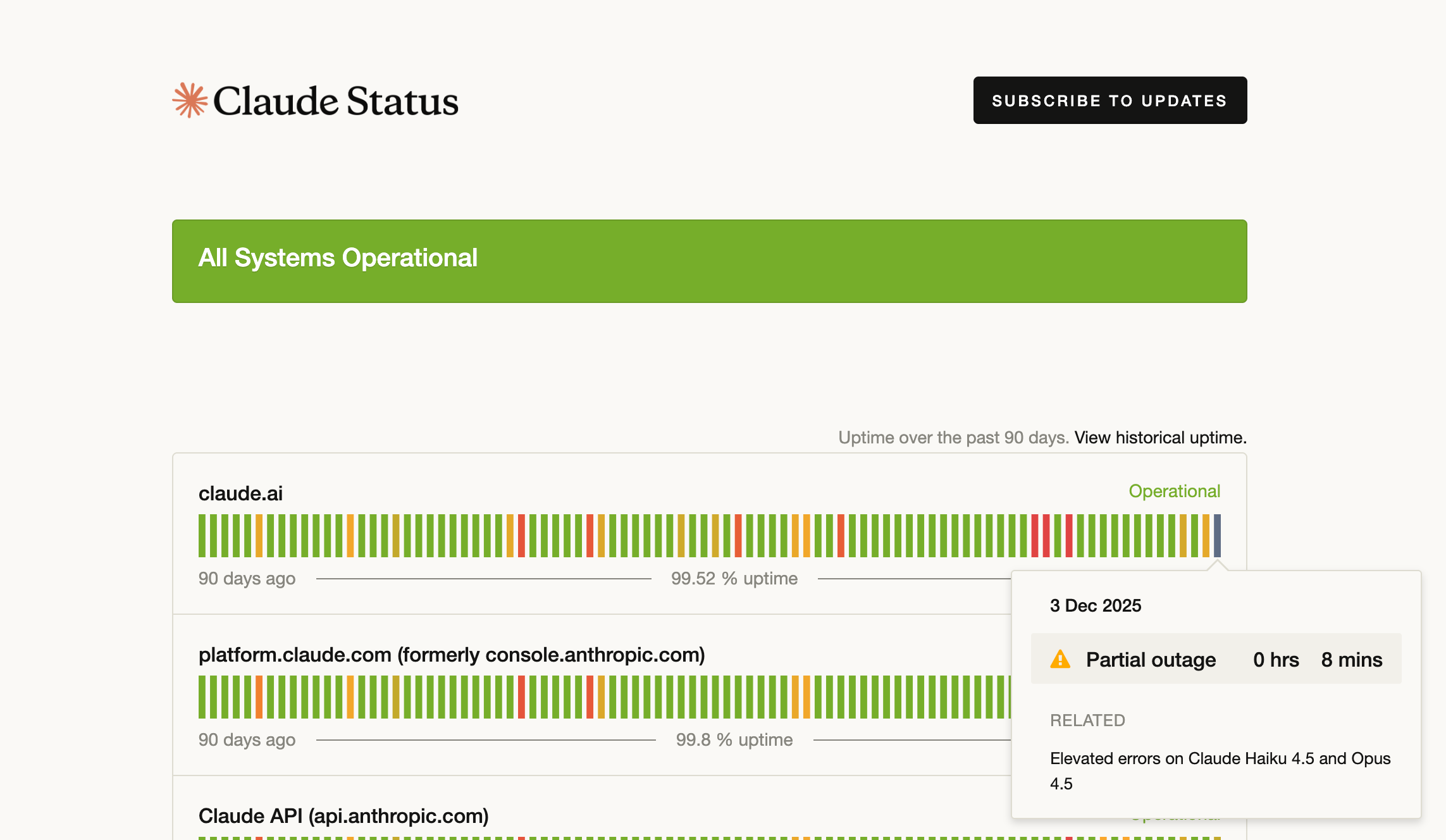 Anthropic status page showing Opus 4.5 and Haiku 4.5 experiencing issues
In my case, the status page immediately revealed the problem:
- Claude Opus 4.5: Experiencing elevated error rates
- Claude Haiku 4.5: Partial outage with API timeouts
- Claude Sonnet 4.5: Operational
This explained everything. I was using Opus 4.5 for complex reasoning tasks, and it was currently experiencing service degradation. The tokens weren’t being consumed because the model wasn’t responding—but critically, other Claude models were still available.
Why Status Pages Matter
In the world of AI-assisted development, we’ve become so dependent on these tools that outages feel catastrophic. But understanding that:
- Individual models can experience issues while others remain operational
- Planned maintenance happens regularly (check the status page for schedules)
- Partial outages are often model-specific, not platform-wide
This knowledge transforms a productivity-killing mystery into a solvable problem with a clear action plan: switch models.
🔄 The Solution: Switching to Sonnet 4.5
Claude Code offers a powerful feature that many users overlook: the ability to switch between models on the fly. Anthropic’s model family includes:
- Claude Opus 4.5: Maximum intelligence, best for complex reasoning, architecture decisions, and multi-step problem solving
- Claude Sonnet 4.5: Balanced performance and speed, excellent for most development tasks
- Claude Haiku 4.5: Fast and efficient, ideal for simple queries and quick iterations
When Opus and Haiku were experiencing issues, Sonnet became my lifeline.
How to Switch Models in Claude Code
The process is straightforward using the /model command:
# Check current model
/model

# Switch to Sonnet 4.5
/model sonnet

# Switch to Opus 4.5 (when it's working)
/model opus

# Switch to Haiku 4.5 for speed
/model haiku
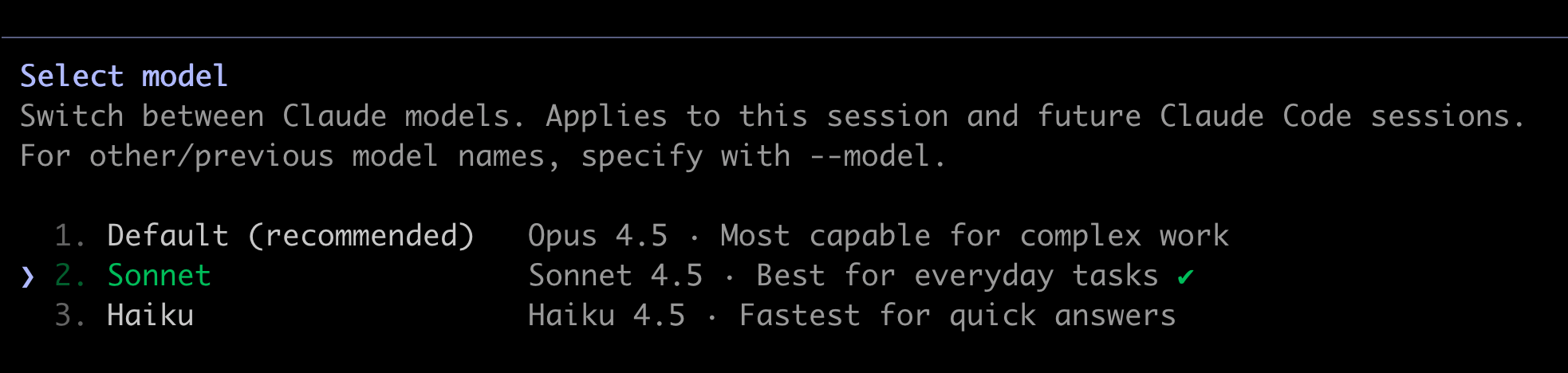 Claude Code model selection interface with Sonnet 4.5 highlighted
The switch is instantaneous, and Claude Code seamlessly continues your conversation context with the new model. In my case, switching to Sonnet not only restored functionality but also provided surprisingly good results for my refactoring task.
Understanding Model Tradeoffs
Each model has distinct characteristics that make it suitable for different scenarios:
Claude Opus 4.5:
- Strengths: Complex architecture, multi-file refactoring, nuanced debugging
- Weaknesses: Slower responses, higher cost, occasional availability issues
- Best for: Critical features, architectural decisions, intricate problem-solving
Claude Sonnet 4.5:
- Strengths: Fast, reliable, excellent code quality, great balance
- Weaknesses: May struggle with extremely complex reasoning chains
- Best for: Most development tasks, feature implementation, bug fixes
Claude Haiku 4.5:
- Strengths: Blazing fast, cost-effective, great for iterations
- Weaknesses: Limited context understanding, simpler reasoning
- Best for: Quick fixes, documentation, simple queries
In my experience, Sonnet 4.5 handles 80-90% of development tasks brilliantly, making it the perfect fallback when premium models experience issues.
🛡️ Building Resilience: The Value of Model Options
This incident highlighted a crucial insight: having model flexibility isn’t just about optimization—it’s about continuity. When you’re relying on AI for development work, a single point of failure can derail your entire workflow.
The Three-Tier Resilience Strategy
I now approach Claude Code with a resilience mindset:
Tier 1: Primary Model Selection
- Use Opus 4.5 for genuinely complex tasks requiring deep reasoning
- Default to Sonnet 4.5 for standard development work
- Reserve Haiku 4.5 for rapid iterations and simple queries
Tier 2: Model Switching Within Anthropic
- Monitor response times and token consumption
- Switch models at first sign of degraded performance
- Check status page when experiencing timeouts
Tier 3: Alternative AI Providers (discussed below)
- Have backup providers configured and ready
- Understand which alternatives excel at specific tasks
- Maintain API access to multiple platforms
This strategy ensures that an issue with a single model—or even a single provider—doesn’t stop your work.
🌐 Beyond Anthropic: Fallback to Other AI Providers
While Claude Code is tightly integrated with Anthropic’s models, there are times when you need to go beyond the ecosystem entirely. Perhaps all Anthropic models are experiencing issues, you’ve hit usage limits, or you need capabilities specific to another provider.
Available Fallback Options
Google Gemini:
- Access: Direct API or through Claude Code Router with OpenRouter
- Strengths: Excellent code generation, strong at structured outputs, competitive pricing
- Best for: When you need Google’s ecosystem integration or specific Gemini features
- Setup: Configure via OpenRouter or direct Gemini API
OpenAI Codex / GPT Models:
- Access: Through Claude Code Router + OpenRouter
- Strengths: GPT-4o excels at complex reasoning, GPT-4o-mini is cost-effective
- Best for: Tasks where you’ve found GPT performs better, or when exploring model differences
- Note: GPT-5 requires BYOK (Bring Your Own Key) on OpenRouter
Qwen (Alibaba):
- Access: Free tier available on OpenRouter
- Strengths: Qwen3 Coder optimized for development tasks, massive 262K context window
- Best for: Cost-conscious development, experimenting with Chinese tech stack models
- Surprising quality: Free doesn’t mean inferior—Qwen handles routine tasks remarkably well
DeepSeek:
- Access: Free on OpenRouter, also available through API
- Strengths: Strong reasoning capabilities, particularly good for debugging
- Best for: When you need fresh perspective on complex bugs
- Bonus: Open-weight model with solid general performance
Setting Up Claude Code Router for Multi-Provider Access
To access these alternatives, you’ll need Claude Code Router—a powerful proxy that routes Claude Code requests to any compatible LLM provider.
Quick Setup:
# Install Claude Code Router
npm install -g @musistudio/claude-code-router

# Start the router
ccr start

# Open the configuration UI to set up providers
ccr ui
The router UI at http://localhost:3456 provides visual configuration for routing rules, letting you assign specific models to different scenarios (Default, Background, Think, Long Context).
For a comprehensive guide on setting up Claude Code Router with OpenRouter, including detailed configuration examples and advanced routing strategies, check out my previous post: Claude Code Router and OpenRouter: Beyond Anthropic.
When to Use Alternative Providers
Immediate Fallback Scenarios:
- All Anthropic models experiencing issues (check status page)
- Hit Claude usage limits mid-project
- Specific task better suited to another model (e.g., GPT for certain types of creative writing)
Strategic Use Cases:
- Cost optimization: Use free Qwen/DeepSeek for routine tasks, save Claude credits for complex work
- Model comparison: Test same task across providers to find best fit
- Privacy requirements: Self-hosted Ollama for sensitive code
- Experimentation: Explore different model capabilities and approaches
Important Consideration: Not all models support Claude Code’s tool/function calling features. Many free models excel at code generation and explanation but can’t execute file operations or git commands. Route accordingly:
- Tool-capable: Claude models, GPT-4o series, some Gemini models
- Text-only: Most free models (great for explanations, reviews, documentation)
💡 Lessons Learned: Best Practices for Resilient AI Development
After this experience, I’ve adopted several practices that have made my AI-assisted workflow more robust:
1. Monitor, Don’t Assume
Before this incident, I assumed timeouts were always local issues—my network, my configuration, my code.
Now, my troubleshooting checklist starts with:
- Check Anthropic status page
- Test model switching
- Verify network/configuration
- Consider alternative providers
This simple reordering saves hours of misdirected debugging.
2. Diversify Your Model Strategy
Don’t over-optimize for a single model. I used to default to Opus for everything, thinking “more powerful = better results.” This created:
- Higher costs
- Slower responses
- Single point of failure
Now, I match models to task complexity:
- Haiku for quick iterations and documentation
- Sonnet for standard feature development
- Opus reserved for genuinely complex architectural work
This approach is faster, cheaper, and more resilient.
3. Maintain Provider Optionality
Even if you primarily use Anthropic models, having Claude Code Router configured with alternatives provides peace of mind. I keep:
- OpenRouter account with $10 credit (lasts months with free models)
- Gemini API key for Google ecosystem tasks
- Local Ollama for privacy-sensitive work
I rarely use these alternatives, but when I need them—during outages or for specific capabilities—they’re immediately available.
4. Understand Usage Patterns
Track which models you actually need for different tasks. I discovered:
- 70% of my queries work perfectly with Sonnet
- 20% benefit from Opus’s reasoning
- 10% are simple enough for Haiku
This awareness helps with both model selection and cost management.
5. Bookmark the Status Page
Add status.anthropic.com to your bookmarks. When you encounter issues:
- Check status page FIRST
- Save time troubleshooting phantom problems
- Understand incident scope and ETA
It seems obvious in hindsight, but it’s easy to forget during a frustrating timeout scenario.
🔧 Practical Troubleshooting Workflow
When you encounter API timeouts or unresponsive behavior in Claude Code, follow this systematic approach:
Step 1: Quick Diagnostics (2 minutes)
# Check current model
/model

# Verify Claude Code status
claude status

# Check your usage/limits
# (Available in Claude Code UI or API dashboard)
Step 2: Status Verification (1 minute)
- Open status.anthropic.com
- Look for incidents affecting your current model
- Note any planned maintenance windows
Step 3: Model Switch Test (1 minute)
# Try switching to different Anthropic model
/model sonnet

# Send a simple test query
"Hello, are you responding correctly?"
If this works, the issue is model-specific. Continue with the working model.
Step 4: Alternative Provider (if needed)
If all Anthropic models are affected:
# Launch Claude Code Router (if configured)
ccr start

# Switch to alternative via router
/model openrouter,gemini-2.0-flash-exp

# Continue your work
Step 5: Long-term Resolution
- Monitor status page for all-clear
- Switch back to preferred model when available
- Consider adjusting default model based on reliability patterns
🧠 Final Thoughts: Embrace Model Diversity
The myth of the “perfect AI model” is just that—a myth. The reality is more nuanced:
- Different models excel at different tasks
- Availability and reliability vary over time
- Cost considerations matter for sustainable usage
- Privacy and security requirements differ by project
My API timeout experience was frustrating in the moment, but it led to a valuable realization: the most powerful feature of Claude Code isn’t access to the best model—it’s the flexibility to choose the right model for right now.
Key Takeaways
- Status pages are your friend: Check status.anthropic.com when issues arise
- Model switching is simple: Use
/modelcommand to switch between Sonnet, Opus, and Haiku - Sonnet is underrated: The “balanced” model handles most tasks brilliantly
- Build fallback options: Configure Claude Code Router for multi-provider access
- Match models to tasks: Don’t use Opus for everything just because it’s “premium”
- Systematic troubleshooting saves time: Follow a consistent diagnostic process
What’s Next?
The AI development landscape continues to evolve rapidly. Features I’m watching:
- Automatic model failover: Claude Code detecting issues and switching models automatically
- Usage-based routing: Intelligent model selection based on remaining quotas
- Performance-based learning: Systems that learn which models you prefer for specific tasks
- Cross-provider context: Seamless conversation continuity across different AI providers
Until then, knowing how to manually navigate these scenarios keeps you productive regardless of what the status page shows.
📚 References
- Anthropic Status Page - Real-time service status for Claude models
- Claude Code Documentation - Official setup and usage guides
- Claude Code Router - Multi-provider routing for Claude Code
- OpenRouter - Universal API gateway for 400+ AI models
- Model Context Protocol - Standardized AI tool integration
- Ollama - Run AI models locally for maximum privacy
Have you experienced API timeouts with Claude Code or other AI assistants? What’s your fallback strategy when your primary model isn’t available? Share your experiences and troubleshooting tips in the comments below.